Alert texts and calls
JKP Software monitors and maintains servers and systems for its account holders. When one of them has a critical problem, JKP Software texts the account holder's staff who look after it, and if nobody acknowledges, follows up with an automated phone call. JKP Software also uses these alerts internally and to develop and test the alerting. Alerts are never marketing.
How people opt in
Alerts go only to numbers people enter or confirm themselves. A signed-in account holder opens Phone alerts in their JKP Software account dashboard, enters their own mobile number, chooses texts and/or calls, and saves — agreeing to the consent statement shown with the form:
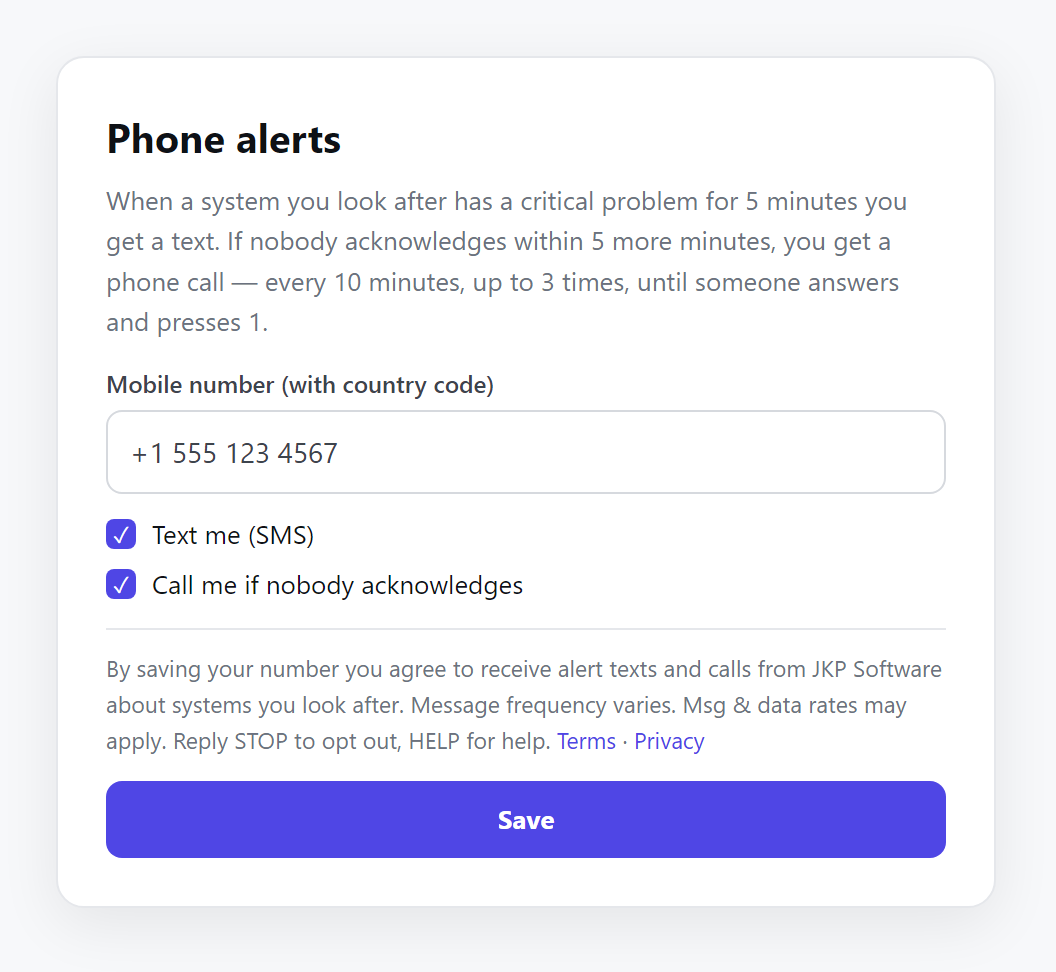
- The account holder signs in to their JKP Software account dashboard and opens Phone alerts.
- They enter their own mobile number, choose texts and/or calls, and read the consent statement.
- They click Save. They can send themselves a test text to confirm.
- They can remove their number at any time, or reply STOP to any text.
Example messages
JKP Software ALERT: val-01 - Node stopped reporting. Open 5 min. Acknowledge: https://jkpsoftware.com/a/… Reply STOP to opt out.
JKP Software RESOLVED: val-01 - Node stopped reporting has cleared (open 12 min).
Programme details
- Message frequency varies — typically a few messages a month, none while systems are healthy.
- Message and data rates may apply.
- Reply STOP to opt out, START to resume, HELP for help.
- Carriers are not liable for delayed or undelivered messages.
- Mobile numbers and opt-in data are never shared with third parties for marketing.